> ## Documentation Index
> Fetch the complete documentation index at: https://ayakaleaf-pro.mintlify.site/llms.txt
> Use this file to discover all available pages before exploring further.
# Ayakaleaf Pro v6.3 is released now
Updated October 3, 2026: Version 6.3.0 has been re-released to address AI Assistant, Zotero, and Mendeley integration issues. Pull the latest `6.3.0` image when upgrading. Existing installations with Zotero or Mendeley linked bibliography files must also follow the [migration instructions](/on-premises/release-notes/release-notes-6.x.x#ayakaleaf-pro-6.3.0 "mention"). New installations do not need this migration.
We are very proud to announce the release of Overleaf Pro 6.3.0, the most powerful and feature-rich online LaTeX editor in the community. As we have always focused on improving our users’ experience, this release brings huge changes and marvelous features that you will definitely love, including AI assistant and 3-rd reference integration.
### Changes
* AI Chat Assistant: Chat with an AI model through your own provider, just in your editor.
* LaTeX Error Assistant: Get AI-suggested fixes for LaTeX compilation errors.
* Mendeley integration: Import references from Mendeley similar to Zotero.
* Open in Overleaf API: Added an API for opening content in Overleaf.
* Template Gallery: Added server-side pagination, search, and sorting, so large galleries no longer need to load every template in the browser.
* Translations: Updated translation patches for 6.3.0, including new interface text across supported languages.
* Upstream Overleaf 6.3.0: Includes tabbed file editing, separate header logos for light and dark themes, and dependency and base image updates.
* Added `OVERLEAF_HEADER_IMAGE_URL_LIGHT` and `OVERLEAF_HEADER_IMAGE_URL_DARK` to support separate header logo images for light and dark themes.
* Files can now be opened in different tabs in the editor.
* External URL fetching and the Open in Overleaf API now support HTTP(S) proxies through `OVERLEAF_LINKED_URL_OUTBOUND_PROXY`. See [Outbound Proxy](/on-premises/configuration/overleaf-toolkit/external-url#outbound-proxy "mention") for configuration.
#### Feature 01: AI Assistant is available now
The AI Assistant lives in the side rail of the editor and talks to the model provider you configure. Ask it the kind of thing you'd ask a colleague: tighten this paragraph, what does this macro do, why won't my table line up. It doesn't answer blind. It can read and search the files in your project, check the LaTeX diagnostics, compile the project and even look at the rendered PDF pages, so its answers come from your actual document.
When it wants to change something, it shows you a diff first. Nothing is written until you approve it, so the paper stays yours.
 The LaTeX Error Assistant is for that familiar late-night moment: a red error in the log and no idea what it means. Click Suggest fix next to the error, and the assistant reads the file that caused it and proposes the smallest change that should fix it, leaving the rest of your formatting alone. If it looks right, apply it with one click and compile again. When a fix touches packages, commands or document structure, give it a quick look first.
 The AI features are off by default. Ayakaleaf Pro works with any OpenAI-compatible endpoint, whether that's OpenAI itself, your company's gateway or a model you host yourself.
See [AI Integration](/on-premises/configuration/overleaf-toolkit/ai-integration "mention") for provider configuration, permissions, quotas, and optional search services.
#### Feature 02: Open in Overleaf API
If you run a course page, a template library or a documentation site, you can now give readers a button that drops them straight into a working project. This feature is enabled by default. Visit `your.overleaf.com/devs` for the full reference and live examples.
The AI features are off by default. Ayakaleaf Pro works with any OpenAI-compatible endpoint, whether that's OpenAI itself, your company's gateway or a model you host yourself.
See [AI Integration](/on-premises/configuration/overleaf-toolkit/ai-integration "mention") for provider configuration, permissions, quotas, and optional search services.
#### Feature 02: Open in Overleaf API
If you run a course page, a template library or a documentation site, you can now give readers a button that drops them straight into a working project. This feature is enabled by default. Visit `your.overleaf.com/devs` for the full reference and live examples.
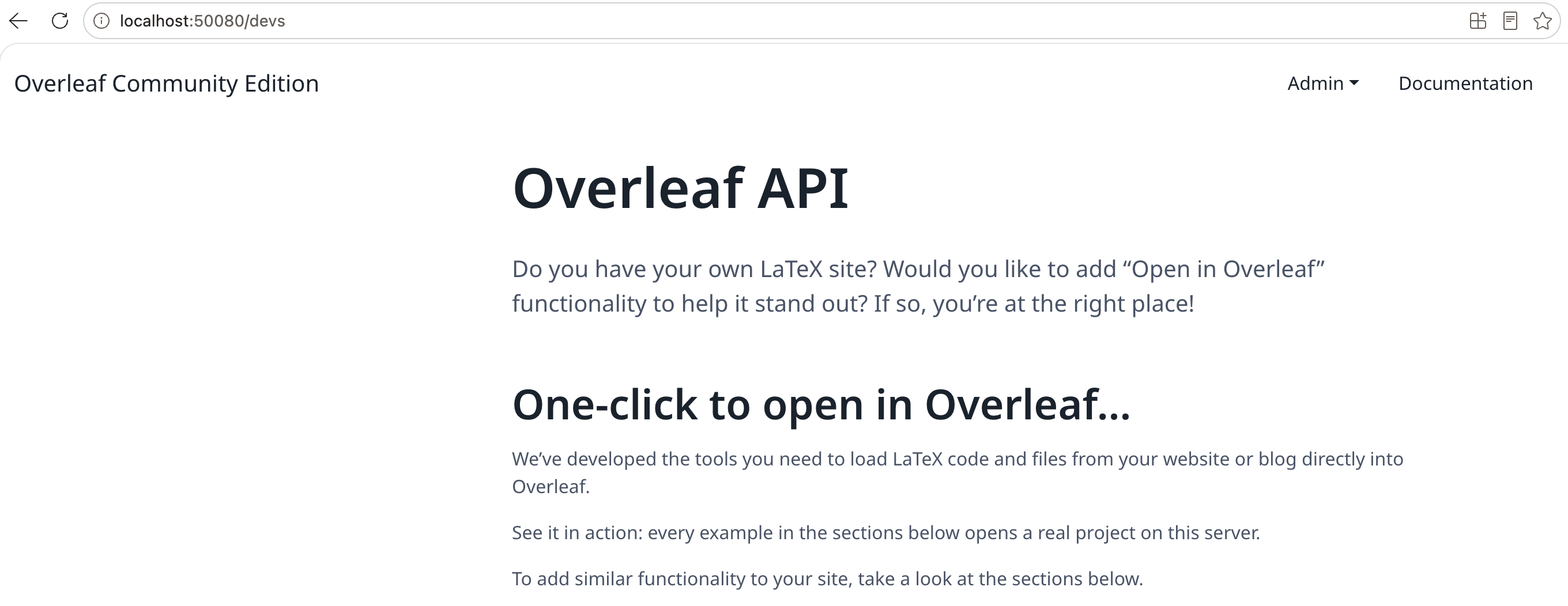 A link or a small form is all it takes. You can send a LaTeX snippet (`snip` or `encoded_snip`), and a bare fragment gets wrapped in a minimal document for you. You can point to one or more remote files with `snip_uri` (up to 50 at a time), or hand over a whole project as a ZIP with `zip_uri`. Optional parameters set the compiler (`engine`), the main document (`main_document`) and the project name (`name`). The content opens as a new project in your instance, ready to edit and compile. If the visitor isn't signed in yet, they log in first and still land in their new project.
```html wrap theme={null}
Open in Overleaf
```
A link or a small form is all it takes. You can send a LaTeX snippet (`snip` or `encoded_snip`), and a bare fragment gets wrapped in a minimal document for you. You can point to one or more remote files with `snip_uri` (up to 50 at a time), or hand over a whole project as a ZIP with `zip_uri`. Optional parameters set the compiler (`engine`), the main document (`main_document`) and the project name (`name`). The content opens as a new project in your instance, ready to edit and compile. If the visitor isn't signed in yet, they log in first and still land in their new project.
```html wrap theme={null}
Open in Overleaf
```
 #### Feature 03: Mendeley integration
In 6.2 we added Zotero, and Mendeley users have been asking for the same ever since. Link your Mendeley account, pick a library or group, and your references come in as a `.bib` file you can refresh whenever your library changes. Just like on overleaf.com, in a shared project only the person who imported the file can refresh it.
For admins: add `mendeley` to `ENABLED_LINKED_FILE_TYPES` and set `MENDELEY_CLIENT_ID` and `MENDELEY_CLIENT_SECRET` from your Mendeley developer app.
See [Mendeley Integration](/on-premises/configuration/overleaf-toolkit/mendeley-integration "mention") for the full setup instructions.
#### Feature 03: Mendeley integration
In 6.2 we added Zotero, and Mendeley users have been asking for the same ever since. Link your Mendeley account, pick a library or group, and your references come in as a `.bib` file you can refresh whenever your library changes. Just like on overleaf.com, in a shared project only the person who imported the file can refresh it.
For admins: add `mendeley` to `ENABLED_LINKED_FILE_TYPES` and set `MENDELEY_CLIENT_ID` and `MENDELEY_CLIENT_SECRET` from your Mendeley developer app.
See [Mendeley Integration](/on-premises/configuration/overleaf-toolkit/mendeley-integration "mention") for the full setup instructions.
 #### Feature 04: Template Pagination
The gallery used to load every template into the browser and sort them there. Fine for fifty templates, painful for five thousand. Now paging, searching and sorting all happen in MongoDB, and the browser only receives the page you're looking at.
It works without any preparation. If your gallery has thousands of templates, these indexes will keep it fast. The script is safe to run more than once; replace `mongo` and `sharelatex` with your container and database names:
```bash theme={null}
docker exec mongo mongosh sharelatex --quiet --eval '
db.templates.createIndex({category:1,lastUpdated:-1},{name:"category_1_lastUpdated_-1",background:true});
db.templates.createIndex({lastUpdated:-1},{name:"lastUpdated_-1",background:true});
db.templates.createIndex({category:1,name:1},{name:"category_1_name_1_ci",collation:{locale:"en",strength:2},background:true});
db.templates.createIndex({name:1},{name:"name_1_ci",collation:{locale:"en",strength:2},background:true});
'
```
Keep the `collation` on the two `*_ci` indexes as written — the gallery queries with the same collation and MongoDB only uses a matching index.
#### Feature 04: Template Pagination
The gallery used to load every template into the browser and sort them there. Fine for fifty templates, painful for five thousand. Now paging, searching and sorting all happen in MongoDB, and the browser only receives the page you're looking at.
It works without any preparation. If your gallery has thousands of templates, these indexes will keep it fast. The script is safe to run more than once; replace `mongo` and `sharelatex` with your container and database names:
```bash theme={null}
docker exec mongo mongosh sharelatex --quiet --eval '
db.templates.createIndex({category:1,lastUpdated:-1},{name:"category_1_lastUpdated_-1",background:true});
db.templates.createIndex({lastUpdated:-1},{name:"lastUpdated_-1",background:true});
db.templates.createIndex({category:1,name:1},{name:"category_1_name_1_ci",collation:{locale:"en",strength:2},background:true});
db.templates.createIndex({name:1},{name:"name_1_ci",collation:{locale:"en",strength:2},background:true});
'
```
Keep the `collation` on the two `*_ci` indexes as written — the gallery queries with the same collation and MongoDB only uses a matching index.
 #### Others
For external file imports, configure `OVERLEAF_LINKED_URL_OUTBOUND_PROXY` to use an HTTP(S) proxy, including a locally hosted proxy. This setting applies to both linked URL files and remote ZIP or TeX resources imported through the Open in Overleaf API. See [External URL — Outbound Proxy](/on-premises/configuration/overleaf-toolkit/external-url#outbound-proxy "mention") for setup and network access restrictions.
* Added `OVERLEAF_HEADER_IMAGE_URL_LIGHT` and `OVERLEAF_HEADER_IMAGE_URL_DARK` to support separate header logo images for light and dark themes.
* Files can now be opened in different tabs in the editor.
#### Docker Image
You can find docker image here: [https://github.com/ayaka-notes/ayakaleaf-pro/pkgs/container/overleaf-pro](https://github.com/ayaka-notes/ayakaleaf-pro/pkgs/container/overleaf-pro)
```bash theme={null}
docker pull ghcr.io/ayaka-notes/overleaf-pro:6.3.0
```
***
Release date: 2026-08-28
TexLive 2026 is available for Server Pro instances running [Sandboxed Compiles](https://github.com/overleaf/overleaf/wiki/Server-Pro:-sandboxed-compiles). Check the [documentation](https://docs.overleaf.com/on-premises/configuration/overleaf-toolkit/server-pro-only-configuration/sandboxed-compiles#changing-the-tex-live-image) for instructions to upgrade and the [Release Notes](https://www.overleaf.com/blog/tex-live-2026-is-now-available) for the key changes introduced in this version.
**New Features**
* Added `OVERLEAF_HEADER_IMAGE_URL_LIGHT` and `OVERLEAF_HEADER_IMAGE_URL_DARK` to support separate header logo images for light and dark themes.
* Files can now be opened in different tabs in the editor.
**Other changes**
* Security updates to the base image and installed packages.
Source: [https://docs.overleaf.com/on-premises/release-notes/release-notes-6.x.x](https://docs.overleaf.com/on-premises/release-notes/release-notes-6.x.x)
This documentation is built and hosted on [Mintlify](https://mintlify.com), a developer documentation platform.
#### Others
For external file imports, configure `OVERLEAF_LINKED_URL_OUTBOUND_PROXY` to use an HTTP(S) proxy, including a locally hosted proxy. This setting applies to both linked URL files and remote ZIP or TeX resources imported through the Open in Overleaf API. See [External URL — Outbound Proxy](/on-premises/configuration/overleaf-toolkit/external-url#outbound-proxy "mention") for setup and network access restrictions.
* Added `OVERLEAF_HEADER_IMAGE_URL_LIGHT` and `OVERLEAF_HEADER_IMAGE_URL_DARK` to support separate header logo images for light and dark themes.
* Files can now be opened in different tabs in the editor.
#### Docker Image
You can find docker image here: [https://github.com/ayaka-notes/ayakaleaf-pro/pkgs/container/overleaf-pro](https://github.com/ayaka-notes/ayakaleaf-pro/pkgs/container/overleaf-pro)
```bash theme={null}
docker pull ghcr.io/ayaka-notes/overleaf-pro:6.3.0
```
***
Release date: 2026-08-28
TexLive 2026 is available for Server Pro instances running [Sandboxed Compiles](https://github.com/overleaf/overleaf/wiki/Server-Pro:-sandboxed-compiles). Check the [documentation](https://docs.overleaf.com/on-premises/configuration/overleaf-toolkit/server-pro-only-configuration/sandboxed-compiles#changing-the-tex-live-image) for instructions to upgrade and the [Release Notes](https://www.overleaf.com/blog/tex-live-2026-is-now-available) for the key changes introduced in this version.
**New Features**
* Added `OVERLEAF_HEADER_IMAGE_URL_LIGHT` and `OVERLEAF_HEADER_IMAGE_URL_DARK` to support separate header logo images for light and dark themes.
* Files can now be opened in different tabs in the editor.
**Other changes**
* Security updates to the base image and installed packages.
Source: [https://docs.overleaf.com/on-premises/release-notes/release-notes-6.x.x](https://docs.overleaf.com/on-premises/release-notes/release-notes-6.x.x)
This documentation is built and hosted on [Mintlify](https://mintlify.com), a developer documentation platform.