> ## Documentation Index
> Fetch the complete documentation index at: https://ayakaleaf-pro.mintlify.site/llms.txt
> Use this file to discover all available pages before exploring further.
# Mendeley Integration
This capability is provided by [ayaka-notes/ayakaleaf-pro](https://github.com/ayaka-notes/ayakaleaf-pro) with OAuth 2.0 support and is available from v6.3.0. We welcome your feedback if you encounter any problems.
#### Setup Mendeley Integration
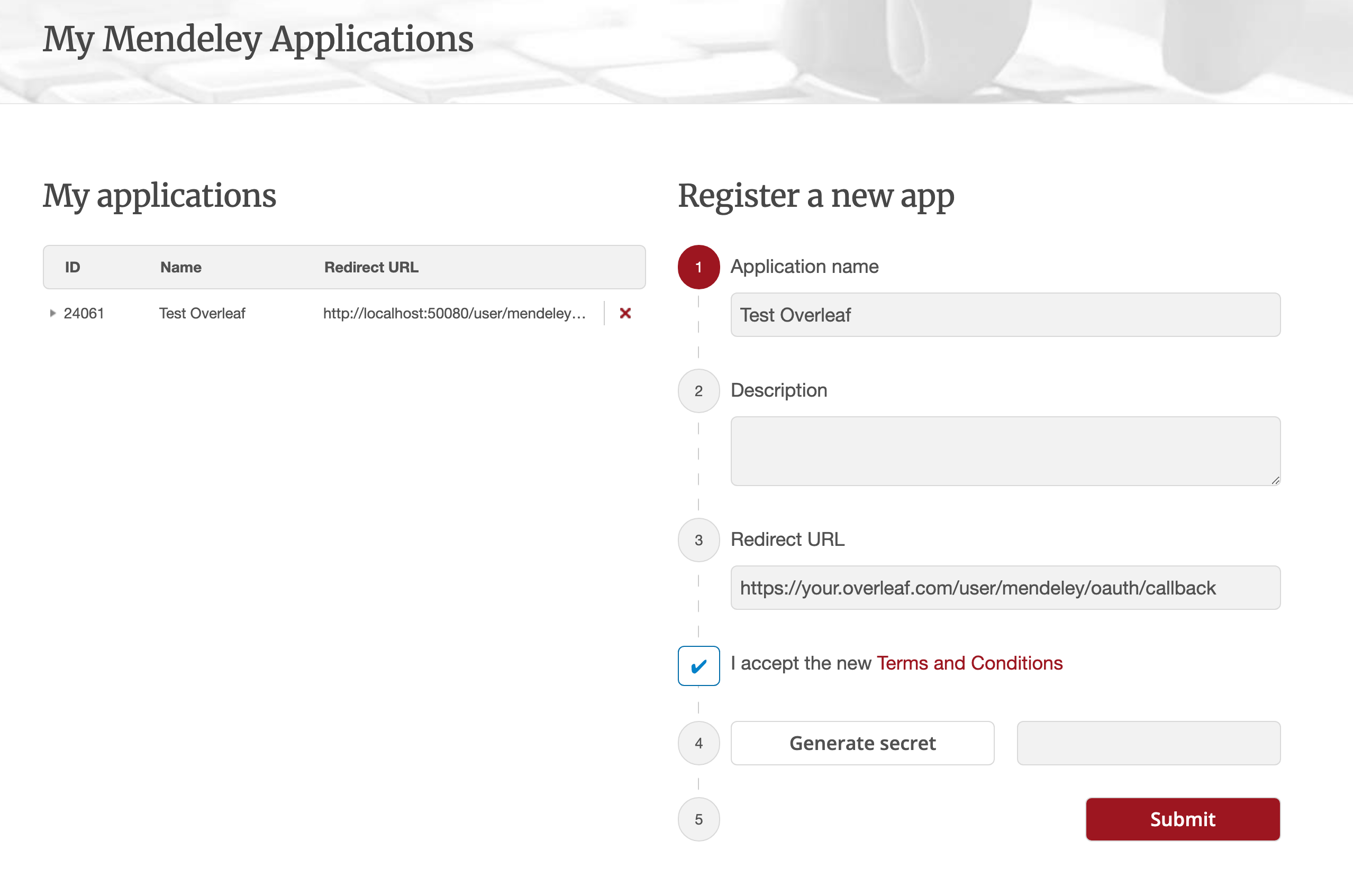
1. Navigate to [this link](https://dev.mendeley.com/myapps.html) to register a Mendeley OAuth application
2. Configure **Redirect URL** as: `${OVERLEAF_SITE_URL}/user/mendeley/oauth/callback`
3. Note the generated **ID** (ususally digital like `24061` as below) and **Secret** of your application
4. Modify your `config/variables.env`
5. Just keep Authorisation Flow: Elsevier (as recommended)
 ```dotenv title="config/variables.env" theme={null}
#################
# Mendeley #
#################
# 'mendeley' must be in ENABLED_LINKED_FILE_TYPES (keep 'zotero' too if you use both)
ENABLED_LINKED_FILE_TYPES=project_file,project_output_file,url,mendeley
# From a Mendeley OAuth application (register at https://dev.mendeley.com/myapps.html)
# Redirect URL -> ${OVERLEAF_SITE_URL}/user/mendeley/oauth/callback
MENDELEY_CLIENT_ID=
MENDELEY_CLIENT_SECRET=
# Encrypts the Mendeley OAuth tokens in mongo; if unset, a key file is generated
# in /var/lib/overleaf/data on first use
# How to generate: `openssl rand -hex 32`
MENDELEY_CIPHER_PASSWORD=
# Optional: route the module's server-side Mendeley requests (OAuth + API) through
# an HTTP proxy (must be reachable from the web container; same as github-sync)
# http://10.0.0.1:10808
# (Optional) MENDELEY_PROXY_URL=
```
`mendeley` must be included in `ENABLED_LINKED_FILE_TYPES` (keep `zotero` in the list too if you use both). `MENDELEY_CLIENT_ID` and `MENDELEY_CLIENT_SECRET` come from your registered OAuth application. The cipher password encrypts the Mendeley OAuth tokens in MongoDB (generate one via `openssl rand -hex 32`); without it a key file is generated in the data volume on first use. Optionally set `MENDELEY_PROXY_URL` to route the server-side Mendeley requests (OAuth + API) through an HTTP proxy accessible from the web container.
### Notes
When upgrading an existing installation with Mendeley linked bibliography files to the re-released 6.3.0, follow the [Zotero / Mendeley migration instructions](/on-premises/release-notes/release-notes-6.x.x#ayakaleaf-pro-6.3.0 "mention"). New installations do not need this migration.
Since Ayakaleaf is a collaborative platform, to improve security, starting with version 6.3.0, only the original creator of a Reference `bib` file will be allowed to update the imported file.
For example, suppose the project owner, User A, enables link sharing and creates a `test.bib` file in the project, linking it to their own Zotero account. If another user, User B, accesses the project through the shared link, User B will still be able to read and download `test.bib`, but will not be allowed to update or re-import the file from Zotero. Only User A, as the original creator of the Reference file, can perform updates. Conversely, only the original creator of the `.bib` file has permission to update it.
This documentation is built and hosted on [Mintlify](https://mintlify.com), a developer documentation platform.
```dotenv title="config/variables.env" theme={null}
#################
# Mendeley #
#################
# 'mendeley' must be in ENABLED_LINKED_FILE_TYPES (keep 'zotero' too if you use both)
ENABLED_LINKED_FILE_TYPES=project_file,project_output_file,url,mendeley
# From a Mendeley OAuth application (register at https://dev.mendeley.com/myapps.html)
# Redirect URL -> ${OVERLEAF_SITE_URL}/user/mendeley/oauth/callback
MENDELEY_CLIENT_ID=
MENDELEY_CLIENT_SECRET=
# Encrypts the Mendeley OAuth tokens in mongo; if unset, a key file is generated
# in /var/lib/overleaf/data on first use
# How to generate: `openssl rand -hex 32`
MENDELEY_CIPHER_PASSWORD=
# Optional: route the module's server-side Mendeley requests (OAuth + API) through
# an HTTP proxy (must be reachable from the web container; same as github-sync)
# http://10.0.0.1:10808
# (Optional) MENDELEY_PROXY_URL=
```
`mendeley` must be included in `ENABLED_LINKED_FILE_TYPES` (keep `zotero` in the list too if you use both). `MENDELEY_CLIENT_ID` and `MENDELEY_CLIENT_SECRET` come from your registered OAuth application. The cipher password encrypts the Mendeley OAuth tokens in MongoDB (generate one via `openssl rand -hex 32`); without it a key file is generated in the data volume on first use. Optionally set `MENDELEY_PROXY_URL` to route the server-side Mendeley requests (OAuth + API) through an HTTP proxy accessible from the web container.
### Notes
When upgrading an existing installation with Mendeley linked bibliography files to the re-released 6.3.0, follow the [Zotero / Mendeley migration instructions](/on-premises/release-notes/release-notes-6.x.x#ayakaleaf-pro-6.3.0 "mention"). New installations do not need this migration.
Since Ayakaleaf is a collaborative platform, to improve security, starting with version 6.3.0, only the original creator of a Reference `bib` file will be allowed to update the imported file.
For example, suppose the project owner, User A, enables link sharing and creates a `test.bib` file in the project, linking it to their own Zotero account. If another user, User B, accesses the project through the shared link, User B will still be able to read and download `test.bib`, but will not be allowed to update or re-import the file from Zotero. Only User A, as the original creator of the Reference file, can perform updates. Conversely, only the original creator of the `.bib` file has permission to update it.
This documentation is built and hosted on [Mintlify](https://mintlify.com), a developer documentation platform.