

Introductions
Before you delve into development, We hope you can understand the folloing things:- Overleaf is developed in an internal repository officially, and the community edition is published in overleaf/overleaf. A copybot is responsible for synchronizing code between the internal and public repositories.
- Ayaka-notes/overleaf-pro is a forked version of overleaf community, We hope this project can be long-term, so please follow the rules before make contributions.
Commit Rules
- Please do not make extensive modifications to the existing Overleaf code. Concentrate as much functionality as possible in the
services/web/modulesfolder. This will minimize our workload when merging and updating the code later. - Vibe coding is indeed very an easy way, but it can easily make a mess of our project, making it unmaintainable later on, so please use it with caution.
- Please do not add any translation-related content during development; use existing translations whenever possible.
- Avoid introducing environment variables unless absolutely necessary. If required, ensure they are as consistent as possible with those in the Overleaf toolkit or docs.overleaf.com.
Branch Rules
We use the following branch for overleaf-pro development:main: This branch is used only for upstream code synchronize, please DO NOT commit any external changes. In this branch, we will set some tags likece-v[X.x.x], which indecates this corresponds tov[X.x.x]in the Overleaf Official Community Edition. Notes: this tag is immutable!server-pro: This branch is the default branch for daily development.feature-X: This branch is used for development a specific feature.release-vX.0.0: The branch specific for release, we will do some hot-fix becore release.
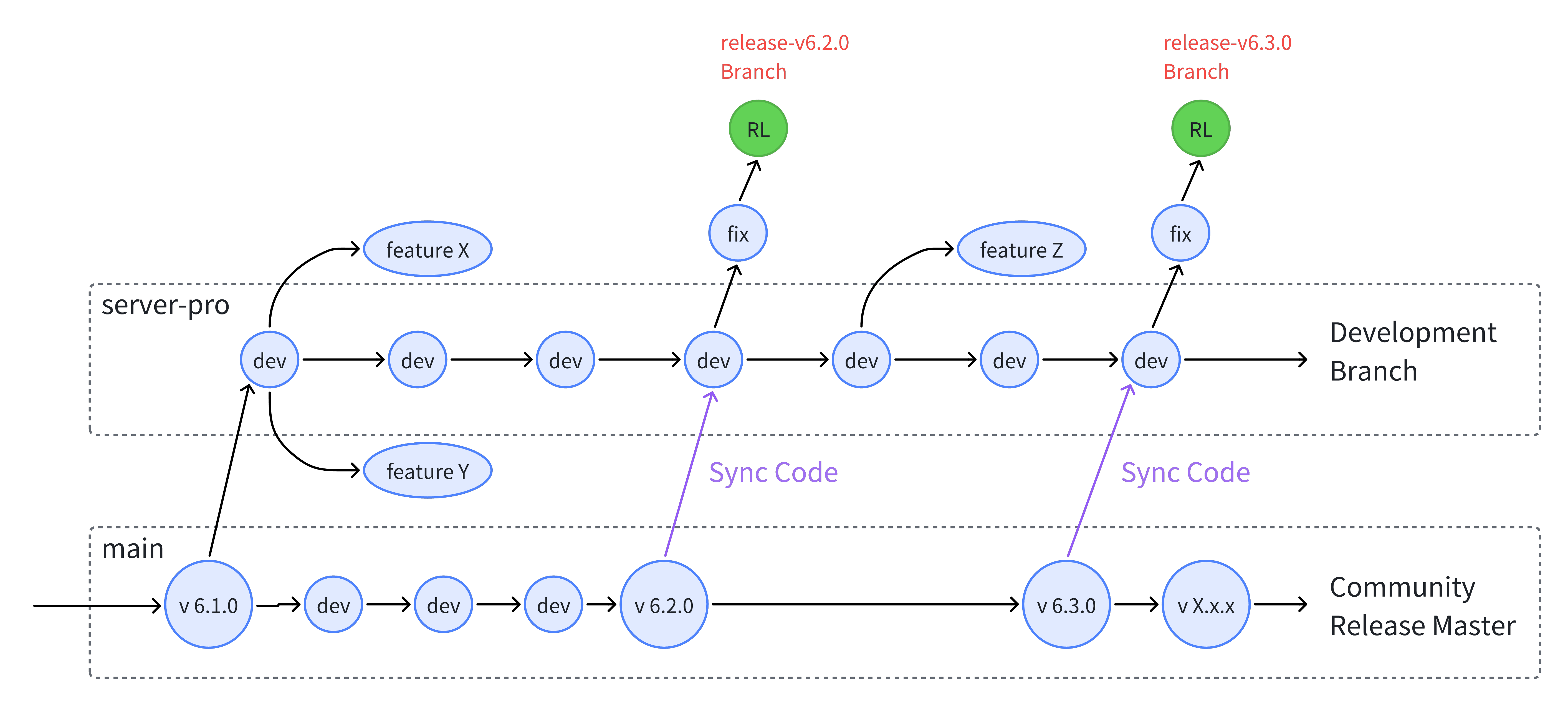
Branch Rules for Overleaf Pro
GitHub Action
GitHub Action is responsible for auto CI/CD, which includes:- Nightly update main branch
- Build docker image for development
- Release docker image
Q&A
How to find the commit hash for Overleaf Community Edition X.0.0 ?
How to find the commit hash for Overleaf Community Edition X.0.0 ?
First of all, you need to pull the docker image and run with the following command to inspect labels in this docker image:Then you can check if the commit(b0d05c0) is present in upstream master branch.
bash
Why the commit hash is the same in CE image between 6.0.0 and 6.0.1?
Why the commit hash is the same in CE image between 6.0.0 and 6.0.1?
This is an expected behavior. The 6.0.1 release is a minor patch release built on top of the 6.0.0 image. The changes are applied by patching the existing 6.0.0 image, instead of rebuilding the image from a new commit. Therefore, the commit hash inside the image is identical between 6.0.0 and 6.0.1.For detailed infomation, see hotfix.